
JPEG vs PNG: Which Image Format Should You Use?
When working with digital images, choosing the right file format can significantly impact quality, file size, and compatibility. Two of the most common image formats are JPEG and PNG, each with distinct advantages and ideal use cases. In this comprehensive guide, we'll explore the differences between JPEG and PNG to help you make informed decisions for your specific needs.
What is JPEG?
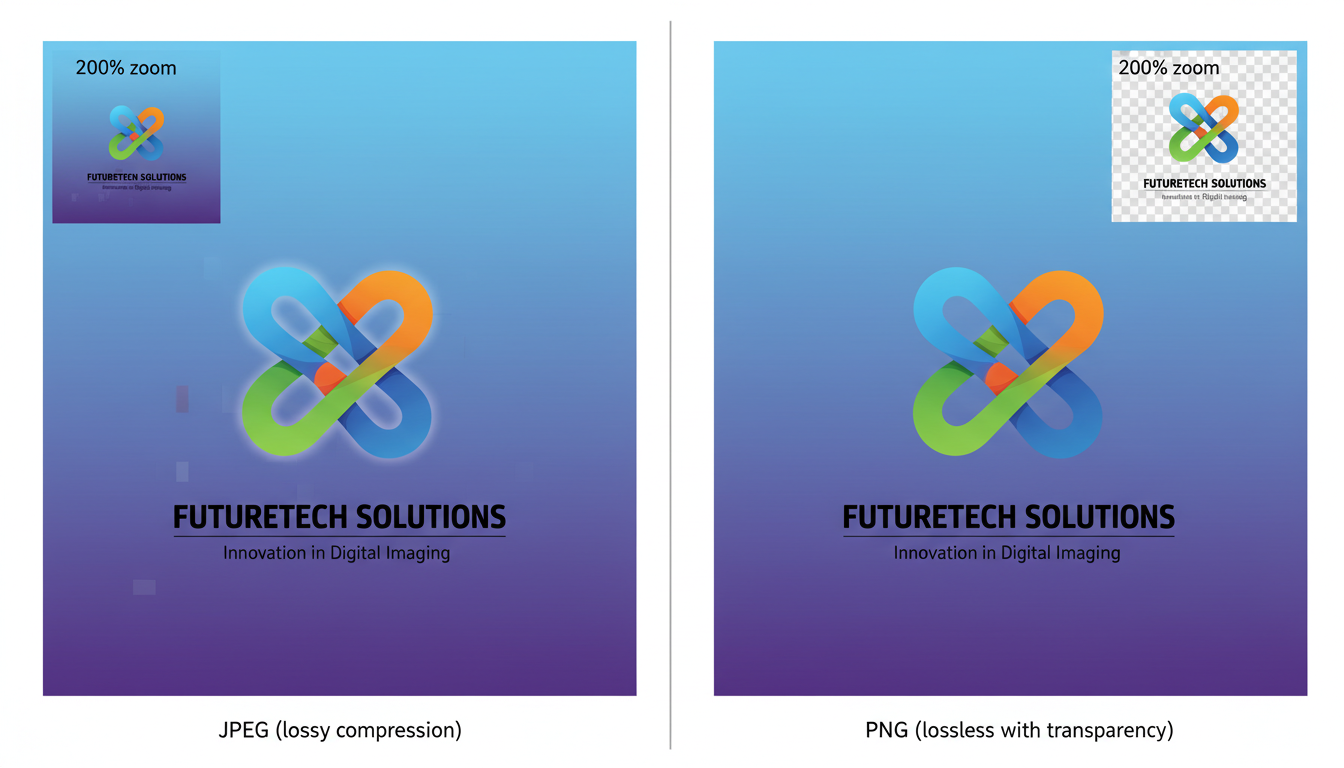
JPEG (Joint Photographic Experts Group) is a lossy compression format designed for photographic images. It was created to reduce file sizes while maintaining reasonable image quality. JPEG supports up to 16.7 million colors and is ideal for complex images with gradients and color variations, such as photographs.
The key characteristic of JPEG is its lossy compression, which means some image data is discarded to reduce file size. This makes JPEG files smaller but can result in quality degradation, especially when the image is repeatedly edited and saved.
What is PNG?
PNG (Portable Network Graphics) is a lossless compression format developed as an improved replacement for GIF. It supports transparency, which allows for images with transparent backgrounds. PNG can display up to 16 million colors in 24-bit RGB or 48-bit color, and it also supports 8-bit grayscale images.
Unlike JPEG, PNG uses lossless compression, meaning no image data is lost during compression. This results in higher quality images but larger file sizes compared to JPEG.
Key Differences Between JPEG and PNG
| Feature | JPEG | PNG |
|---|---|---|
| Compression Type | Lossy | Lossless |
| Best For | Photographs, complex images | Graphics, logos, images with text |
| Transparency | No | Yes (alpha channel) |
| File Size | Smaller | Larger |
| Color Support | 16.7 million colors | 16 million+ colors |
| Quality Retention | Degrades with repeated saves | Maintains original quality |
| Animation Support | No | Static only (APNG for animation) |
When to Use JPEG
JPEG is the ideal choice for:
- Photographs: The lossy compression is perfect for complex photographic images with many colors and gradients.
- Web images: Smaller file sizes lead to faster loading times, improving user experience and SEO.
- Email attachments: Reduced file sizes make sharing images via email more efficient.
- Large image libraries: When storage space is a concern, JPEG's compression helps save space.
When to Use PNG
PNG is the better choice for:
- Logos and icons: The lossless compression maintains sharp edges and clean lines.
- Images with transparency: PNG's alpha channel allows for transparent backgrounds.
- Screenshots: PNG preserves text and UI elements with perfect clarity.
- Images requiring editing: Since PNG is lossless, it can be edited and saved multiple times without quality degradation.
- Simple graphics: Images with large areas of solid color compress well in PNG format.
Frequently Asked Questions
Can I convert a JPEG to PNG without losing quality?
Yes, you can convert a JPEG to PNG without additional quality loss, but you cannot recover the quality that was lost when the image was originally saved as a JPEG. The conversion process itself won't degrade the image further, but the original compression artifacts from the JPEG will remain.
Which format is better for printing?
For most printing purposes, neither JPEG nor PNG is ideal. TIFF or RAW formats are preferred for professional printing as they offer the highest quality without compression. However, if you must choose between JPEG and PNG, PNG is generally better for high-quality prints of graphics or text, while high-resolution JPEGs (300 DPI or higher) can work well for photographs.
Does Google prefer JPEG or PNG for SEO?
Google doesn't have a preference for specific image formats, but it does prioritize page speed and user experience. Since JPEGs typically have smaller file sizes, they often load faster, which can positively impact SEO. However, the most important factor is using the right format for your content. Use JPEG for photographs and PNG for graphics that require transparency or crisp text.
Can PNG files be animated?
Standard PNG files are static images. However, there is an extension called APNG (Animated Portable Network Graphics) that supports animation. APNG is not as widely supported as GIF for animations, so for compatibility, GIF is still the preferred format for simple animations.
How can I reduce the file size of a PNG without losing quality?
Since PNG uses lossless compression, you can reduce file size without losing quality by optimizing the compression. Tools like Image Converter Pro can optimize PNG files by removing unnecessary metadata and using more efficient compression algorithms. Additionally, reducing the number of colors (using an 8-bit PNG instead of 24-bit) can significantly reduce file size for simple graphics.
Conclusion
Choosing between JPEG and PNG depends entirely on your specific needs. For photographs and complex images where file size is a concern, JPEG is the clear winner. For graphics, logos, images requiring transparency, or any image that needs to be edited multiple times, PNG is the superior choice.
Understanding these differences will help you make informed decisions about image formats, ensuring your images look their best while optimizing for performance and storage. With Image Converter Pro, you can easily convert between these formats as needed, giving you the flexibility to use the right format for every situation.