
Social Media Image Formats & Sizes: The Complete Guide (2025)
Why formats & sizes matter
Using the right image format and size reduces load time, preserves visual quality, and prevents awkward crops or blurry thumbnails. With mobile-first feeds and varied display densities (retina / 2x), preparing images correctly influences engagement and conversion.
Common image formats — when to use each
- JPEG (JPG) — Best for photos and complex images where lossy compression is acceptable. Small files at good quality after tuning quality/compression.
- PNG — Use when you need lossless quality or transparency. PNGs are larger; prefer for logos and graphics with flat colors.
- WebP — Modern format (both lossy & lossless). Great balance of quality and file size; supported by most modern browsers and social networks.
- AVIF — Excellent compression and quality; smaller files than WebP but still growing in support. Use on platforms where supported or as a source for fallback generation.
- GIF — Use only for simple animations; heavy in file size compared to modern video-backed formats.
- SVG — Vector format for logos and icons. Scales without quality loss and typically very small for simple graphics.
Format comparison (quick)
| Format | Best Use | Transparency | Animation | File Size |
|---|---|---|---|---|
| JPEG | Photos, feed images | No | No | Small (lossy) |
| PNG | Logos, icons, images needing alpha | Yes (alpha) | No | Large (lossless) |
| WebP | Photos & graphics — best balance | Yes | Yes (animated WebP) | Smaller than PNG/JPEG |
| AVIF | Cutting-edge photo compression | Yes | Limited | Very small (best) |
| SVG | Logos, icons, scalable graphics | Yes (vector) | Possible with SMIL/CSS | Very small for simple graphics |
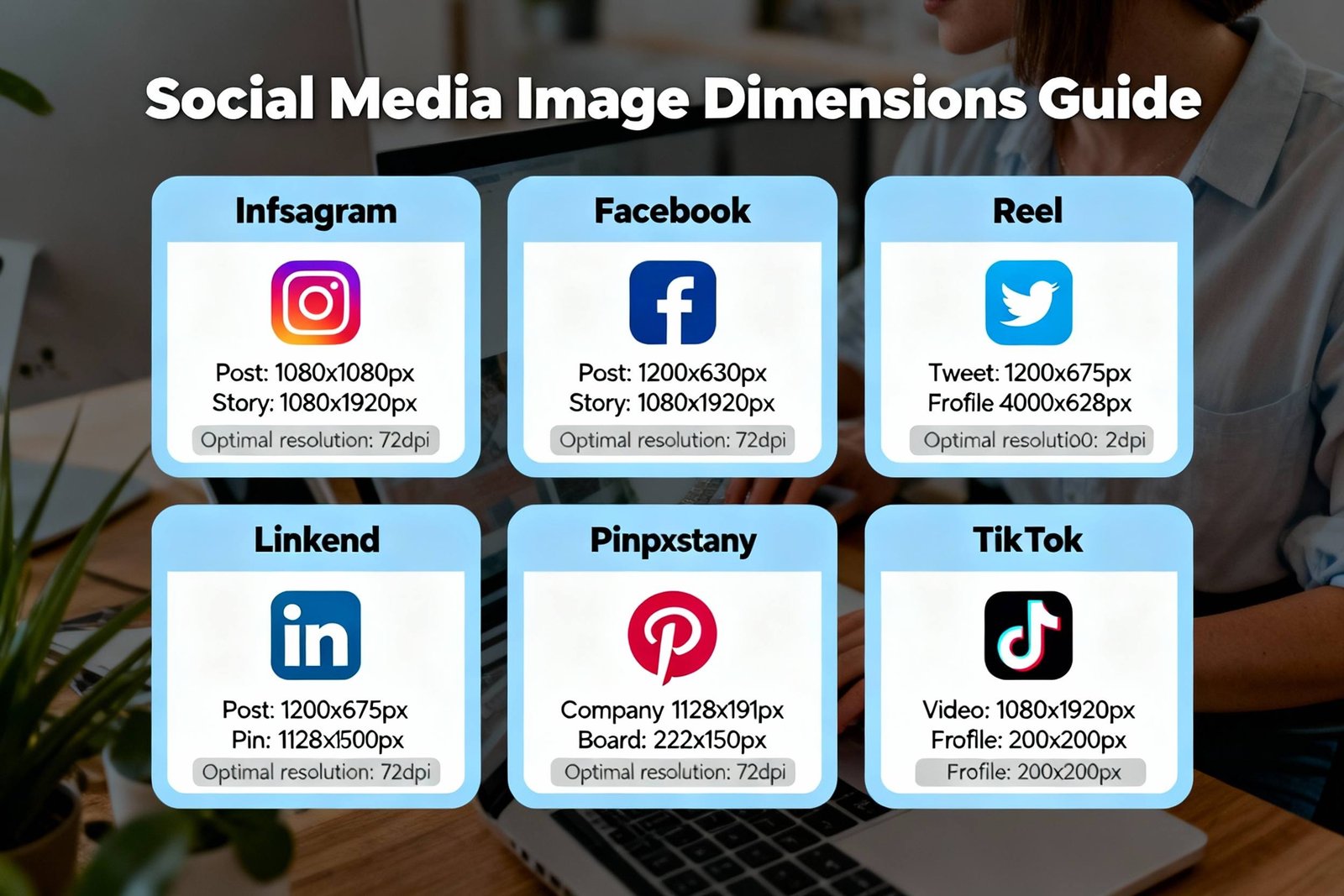
Social platform image size cheat sheet (recommended sizes)
Below are commonly recommended sizes — for best results export at the pixel size below and create 2x versions for high-DPI displays when practical.
| Platform | Image Type | Recommended Size (px) | Format |
|---|---|---|---|
| Feed (square) | 1080 x 1080 | JPEG/WebP | |
| Stories / Reels | 1080 x 1920 | JPEG/WebP | |
| Shared image | 1200 x 630 | JPEG/WebP | |
| Twitter / X | Feed image / preview | 1200 x 675 | JPEG/WebP |
| Shared image | 1200 x 627 | JPEG/WebP | |
| Pin | 1000 x 1500 (2:3) | JPEG/WebP | |
| YouTube | Video thumbnail | 1280 x 720 | JPEG/PNG |
| TikTok | Thumbnail / Cover | 1080 x 1920 | JPEG/WebP |
Optimization tips
- Export at the exact pixel dimensions recommended (or slightly larger) and serve 2x versions for retina screens (e.g., export 2160x2160 for a 1080x1080 target and use srcset).
- Prefer WebP (or AVIF when supported) for smaller file sizes while keeping quality. Provide JPEG/PNG fallback where needed.
- Compress images with perceptual quality settings (e.g., quality 72–85 for JPEG) and inspect visually.
- Use
srcsetand responsive image attributes to deliver the right size for device viewport. - Use SVG for logos & icons; it scales and is tiny for simple shapes.
Example: responsive image markup
<img src="hero-1080.jpg"
     srcset="hero-540.jpg 540w, hero-1080.jpg 1080w, hero-2160.jpg 2160w"
     sizes="(max-width: 600px) 540px, (max-width:1200px) 1080px, 2160px"
     alt="Your caption here">
Visual examples

Quick workflow for publishing
- Design at recommended size or larger (with safe margins for cropping).
- Export as WebP (lossy) with quality around 80, create a JPEG/PNG fallback.
- Test on device and in preview modes for each platform before posting.
- Automate generation of multiple sizes using batch tools or your image pipeline.
FAQ
Generally upload JPEG or WebP for photos. Use PNG or SVG for logos and images that require transparency. If a platform supports WebP automatically, prefer it for lower file sizes.
Yes — many platforms recompress and sometimes downscale images. Upload at recommended sizes and high perceptual quality so recompression artifacts are minimized.
For websites and apps, serve higher-resolution images via srcset. For social networks, upload the recommended pixel size (and platform will usually handle device scaling).
AVIF gives excellent quality/size, but browser and platform support must be considered. Use AVIF as an optimized source and fall back to WebP/JPEG for compatibility.
Final checklist
- Pick WebP or JPEG for photos; PNG/SVG for logos.
- Export at recommended pixel sizes and provide retina (2x) when controlling the frontend.
- Compress visually — aim for the smallest file size without visible quality loss.
- Use
srcsetand modern formats with fallbacks for the best balance of quality and compatibility.
Need a quick conversion or to generate proper sizes automatically? Try our Image Converter tool — it can batch export to WebP/JPEG/PNG and resize for multiple social platforms.